
DataWorks Mobile Applications Versions
Version 4.1.2.0
Major Updates
One Step or Two Step Transfers - system level setting
Physical Inventory Count Toggle
RFID Physical Inventory Options
Microsoft Teams Added to Devices
Navigation Improvements
Swipe to Delete Function Improved
Version 4.1.1.0
Major Updates
Platform Migration
Application rebuilt as native Android app for improved performance and functionality
Navigation Improvements
Redesigned header menu with streamlined options for easier navigation
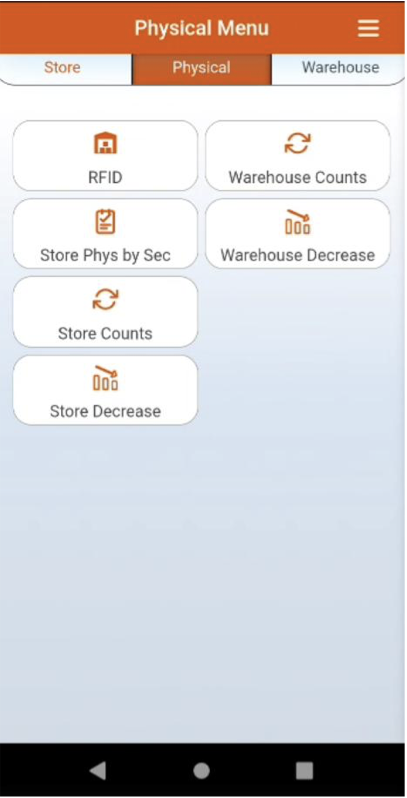
Physical inventory functions relocated to dedicated menu section for better organization
New Features
RFID Physical Inventory (Beta)
Beta release of RFID-enabled physical inventory scanning
Enhanced batch processing capabilities for warehouse operations
Store Physical by Section
Added section-based physical inventory counting
Transfer Out Integration
Transfer Out transactions now automatically create OneStep records when system is configured for this functionality
SKU On-Hand Redesign
Completely redesigned SKU On-Hand form based on user feedback
Optimized layout for faster information access and improved usability
User Configuration Enhancements
Transaction Facility/Warehouse now defaults to user's configured facility settings
Configurable Session Timeout• Client-level configuration for automatic session timeout duration
Default timeout set to 10 minutes with customizable settings per client
Touch Gesture Support
Added standard pinch-to-zoom functionality for improved mobile experience
Bug Fixes
Fixed issue preventing discontinued items from being added to Transfer Out transactions
Count Collection quantity input now limited to 5 digits to prevent accidental barcode scanning into quantity field
System now correctly skips ticket batch creation when ticket type is set to "None"
Improved Store Transfer In UI messaging when user lacks required permissions
Resolved auto logout timer reset functionality issues
Product Description edit now allows text selection and cursor positioning instead of forcing complete overwrite
Version 4.1.0.0
NEW FORMS Decrease Physical
Available for Store and Warehouses
NEW FORMS SKU Store On Hand Search
Available for Store and Warehouses
NEW FORM Warehouse On Hand Search
Added the ability to Search by Sku, Barcode, ProductNumber or Description via lookup for SKU/Barcode on Transactional forms.
Added Menu Driven System defined in DataWorks backoffice tied to Employee Rights to drive what menu pads are active or disabled for users.
Added Initialization Display for Physical Cycle Counts to inform users if a physical was initialized or not.
Added sounds for valid and invalid barcode scans on transactional forms, ability to turn on / off behavior from Settings menu.
User messaging system for Warnings, Errors or Success updated.
Enhancement to UI/UX loading indicator display.
Offline correction forms
Enhancement to Warehouse Locations form.
Count Collection Enhancements for Section and behavior of textbox focus.
UI message when adding new Receipt if one already exists for that Purchase Order.
Jobs page changed to Processing, only available when there is/was a scheduled job in queue from that current day for that employee.
Added default set Facility/Warehouse for Employee to autofill input field when loading a form from main menu
Enhanced Receiving Item Tiles to display Vendor Part Number
Ability to search by Facility Number as well as name in Facility lookups
Added hyperlink to validated SKUs on add item forms to take the user to the product details page for that SKU.
Added filtering system on Store Receiving, Warehouse Transfer In, and Store Transfer In to filter through items in transactions
Added sorting system to SKU On Hand and Warehouse On Hand
Rearranged positions of menu items


Version 4.0.0.0
Added Requisitions for Stores and Warehouses.
Added Transfer In for Warehouses.
Enhanced Transfer In and Receiving to support Display of Quantity Open based on Employee Rights.
Added Default Facility read from Employee Record in DataWorks backoffice to select facility/warehouse upon loading transaction forms.
Re-design most of the UI with enhanced readability and useability in mind.
Software now auto updates when new versions are released.
More support for Employee Rights for Add, Edit, Delete and Process.
More support for Active and Stockkeeping Facilities
Added Pagination to most transactional detail pages with scrolling support.
New navigation button on header to return users to the initial search page for each transaction.
Enhanced transactional detail pages to allow edits of quantity and locations where supported based on transaction and Employee Rights.

DataWorks Mobile
Designed for all levels of users and specifically targeted to maximize the work of frontline team members.